The Lab
Tools by task
Explore all toolsBuild a causal diagramDAG Studio Map study timingStudy Design Studio Plan a study & assess dataSPIFD2 Workspace Review reporting completenessTARGET Checklist Assess risk of biasROBINS-I Find tools & integrationsRWE MCP RegistryBuild your AI fluency
Reading List
This Week's Picks Archive How It Works
Writing
About
Contact
Open in browserv3.0

Build a causal diagram

DAG Studio

Make your causal assumptions visible. Draw a diagram, examine backdoor paths, and explore adjustment sets before committing to a study design.

Browser editor available now. Agent connections are optional; the shared-canvas edition is a separate sandbox.

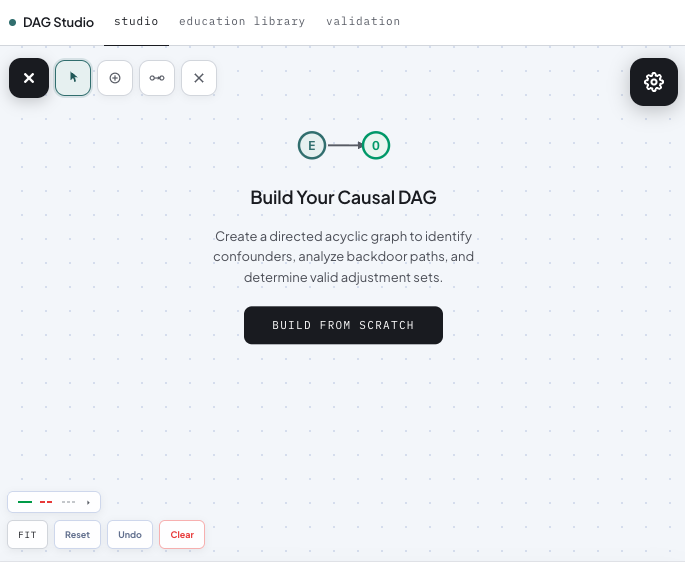
DAG Studio · browser editor // start with your causal question DAG Studio editor with toolbox and an empty canvas prompting Build Your Causal DAG

At a glance

Build a causal diagram.

Who it’s for
Researchers designing observational studies and teams discussing causal assumptions.
What to bring
A research question, an exposure and outcome, and the relationships you want to examine.
What you get
A causal diagram with analytical checks, plus options for simulation and code generation.

Keep in mind Analytical results depend on the graph and its assumptions. A diagram or AI-generated draft does not establish that those assumptions hold in your data.

What's Inside

Three ways to work with causal diagrams.

Build a graph yourself, send a DAG to the analytical server, or invite an agent to work with you in the WebMCP sandbox. Choose the connection that fits your workflow.

The Editor

Drag-and-drop DAGs, with a real identification engine underneath.

Adjusted backdoor path highlighted on a canonical DAG depicting confounding.

The MCP Server

An identification engine an AI assistant can actually call.

Alongside the editor, DAG Studio also runs as a Model Context Protocol (MCP) server. Where the AI DAG Assistant drafts a starting diagram for you to refine, the MCP server does something complementary: it lets an AI assistant query a real causal-inference engine while you reason about study design, checking identifiability, suggesting adjustment sets, and flagging overadjustment, rather than hallucinating about d-separation. The AI proposes; the engine verifies.

Tool surface (v1)

01
Read a DAG Loads a causal diagram written in dagitty's text format so the other tools can work with it. The "import my diagram" step.
02
Find what to adjust for Given an exposure and an outcome, finds the hidden "backdoor" paths that bias the estimate and returns minimal sufficient adjustment sets under the assumptions encoded in the graph.
03
Catch harmful adjustments Takes a proposed adjustment set and flags variables that would add bias rather than remove it: colliders, mediators, and their descendants.
04
Export to R or Python Generates ready-to-run code for the DAG in R (dagitty) or Python (networkx), plus a one-click link to reopen it in the editor.
05
Classify effect modification When a treatment works differently across subgroups, identifies which kind of effect modification is at play, following the VanderWeele-Robins and Weinberg typology.
06
Simulate data from the DAG Generates synthetic data consistent with the DAG (a linear Gaussian model), reproducible from a seed. Useful for testing an analysis, teaching, or demonstrating a bias.
07
Quantify the bias Puts a number on it: computes the true causal effect from the model and shows how far a given adjustment choice lands from it, and in which direction.
08
Look up a reference example Returns a known-correct textbook DAG (classic confounding, M-bias, mediation, and others) by name from the engine's validated library.
09
Verify the engine A self-test an agent can call to confirm the engine still reproduces its validated cases (against Pearl 2009 and dagitty) before relying on its output. The trust signal.

Status

  • Live as a hosted MCP server on Cloudflare Workers.
  • Open source under Apache 2.0: github.com/Black-Swan-Causal-Labs/dagstudio-mcp, with continuous integration and the full validation suite public.
  • Listed in the official MCP Registry as com.blackswancausallabs/dagstudio-mcp.
  • Install and run locally from GitHub, or request an access token for the hosted endpoint.

Use the analytical MCP

Run locally: Install the open-source server from GitHub and connect it to an MCP client using the local stdio transport. Local use does not require a hosted-service token.

Use the hosted service: Connect a compatible remote MCP client to https://dagstudio-mcp.blackswancausallabs.com/mcp using an access token. Request a hosted access token →

WebMCP · Live sandbox

You and your agent.
The same causal diagram.

WebMCP gives a compatible browser agent access to the page's predefined tools. It can read your graph, edit nodes and edges, and run analyses while you follow every change on the canvas.

The WebMCP sandbox is a separate edition of DAG Studio. Its tools operate on the graph in your open tab, with a shared Undo history. The analytical MCP server above accepts DAG inputs independently; connecting to it does not control an open canvas.

Nine tools, one shared canvas

01
Read and edit Read the current DAG. Add or remove nodes and directed edges. Review changes together and use Undo when needed.
02
Analyze and check Analyze the current graph and check a proposed adjustment set against its causal structure.
03
Generate and simulate Generate analysis code and simulate data from the current DAG, keeping the graph as the shared reference.

With a browser agent

Open the sandbox in a WebMCP-capable browser and ask your compatible agent to discover its tools. Native WebMCP works directly with the page and does not need a remote bridge connection.

With a remote MCP client

  1. Open the sandbox, select Connect MCP, then Enable connection.
  2. Add the displayed server URL and authorization header to your client, or use Copy MCP config if supported.
  3. Keep the tab open. Ask the agent to read your graph before editing.

Requires Streamable HTTP and custom-header support. The bridge does not currently provide OAuth sign-in.

Your connection, your session

Remote pairing is optional. Tool arguments and results pass through the Cloudflare relay to your connected agent provider. Anyone with the temporary key can use that canvas's tools. Select Disconnect to end access; closing or reloading the tab also ends the session. Keys expire after two hours.

The remote bridge is listed in the official MCP Registry. A website link alone does not give every agent WebMCP support: use a compatible browser agent or pair a supported remote client. See the connection guide and source for details.

Release History

Versions & provenance.

DAG Studio is at v3.0. WebMCP is a separate interface milestone; its remote bridge has its own version, currently v1.0.

VersionDateHighlights
v3.0Current Sep 2026 Current DAG Studio release. Browser editing and analytical MCP are complemented by a separate WebMCP interface for shared human–agent work on the live canvas.
WebMCP bridge v1.0 Sep 2026 Separate WebMCP sandbox with nine tools for the live browser canvas, an optional paired remote MCP bridge, and an official MCP Registry listing.
v2.0 Jul 2026 AI DAG Assistant that drafts a causal diagram from a plain-language research question, radial layout for generated DAGs, new About and FAQ sections, and console and canvas usability improvements. The MCP server was open-sourced under Apache 2.0 and published to the official MCP Registry.
v1.0 2026 Initial release: drag-and-drop editor, in-browser identification engine, bilingual Python and R console, linear Gaussian SEM data simulation, and the education library.

License

MCP server: Apache 2.0 · Editor: MIT

Citation

Preprint forthcoming. Citation block will be updated on release.

Get Involved

Inspectable, by design.

Inspectable tooling is the right shape for software that may inform regulatory submissions: the engine should not be a black box to the teams and reviewers who rely on it. The MCP server, including the full identification engine and its validation suite, is open source on GitHub under the Apache 2.0 license. Anyone can read the engine, run the 99-test suite, and check the continuous-integration record, and every analytical response carries a concordance attestation against the dagitty reference implementation. The browser editor shares the same engine; its application source is provided to pilot partners and reviewers on request, under the MIT license.

Get started

Start with a causal question.

Open the browser editor, or use the connection guides above to work with an agent.

Open the EditorExplore the other tools ↗